
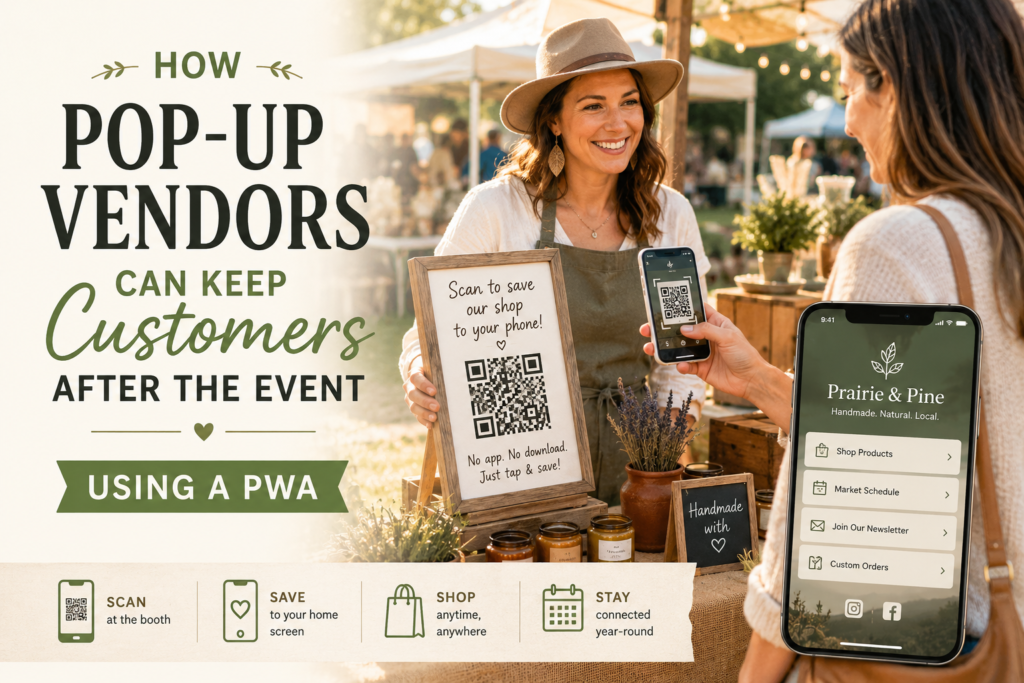
If you’re a PWA for pop-up vendors kind of business — a farmers market seller, art bazaar maker, or mobile retailer — you already know the core challenge. You meet customers once. Then the relationship disappears with the tent.
Business cards get lost in purses. Clipboard signups go cold by Monday. As a result, most of the warm connections you make at a weekend market never turn into repeat sales. That’s the gap a Progressive Web App is built to close.
The Real Cost of Losing Market-Day Momentum
Pop-up events generate incredible energy. People browse your booth, sample your products, compliment your work, and pull out their wallets. However, once they walk away, the clock starts ticking. Without a simple way to stay connected, that one-time buyer becomes a stranger again.
In addition, most vendors rely on Instagram handles or handwritten email lists to bridge that gap. Unfortunately, neither method works well in practice. Social media algorithms bury your posts. Meanwhile, clipboard signups often lead to misspelled addresses and abandoned inboxes. The result is a leaky bucket — lots of interest pouring in on market day, but very little retained afterward.
Furthermore, this problem compounds over time. Every market you attend costs money — booth fees, inventory, travel, setup time. If each event only produces one-time transactions, you’re essentially starting from zero every single weekend. That’s exhausting and expensive.
What Exactly Is a PWA?
Before diving into the solution, let’s clarify what a Progressive Web App actually is. In simple terms, a PWA is a lightweight website that behaves like a mobile app. It loads in a browser, but customers can save it to their home screen with one tap. There’s no app store involved. There’s no download or update process either.
As a result, it removes the biggest barrier between you and your customer’s phone. They don’t need to search for you in the App Store. They don’t need to create an account. Instead, they scan a QR code, tap a button, and your shop lives on their phone from that moment forward.
For small businesses, this matters enormously. Building a native app costs thousands of dollars and months of development time. By contrast, a PWA gives you the same always-available presence at a fraction of the cost. Moreover, it works on every phone — Android and iPhone alike.
How a PWA for Pop-Up Vendors Actually Works
So what does this look like at your booth? The setup is surprisingly simple.
First, you create a PWA that serves as your mobile hub. This typically includes your product catalog with photos and pricing, your upcoming market schedule, an email or SMS signup form, and a custom order form for between-event purchases. Some vendors also add a short “About” section or a link to their social media profiles.
Next, you generate a QR code that links to your PWA. You print it on a small sign or frame it on your table. That’s the entire setup.
Then, during the market, you simply invite customers to scan the code. When they do, your mobile hub opens instantly in their browser. They can browse your full lineup, check your next event date, or sign up for updates. If they tap “Add to Home Screen,” your PWA gets its own icon — right next to their other apps. In other words, you earn a permanent spot on their phone without any friction.
After the event, your PWA keeps working. Customers can browse your products from their couch. They can place a custom order on Tuesday. They can check whether you’ll be at the Saturday market downtown. Consequently, what started as a single transaction turns into an ongoing relationship.
A Day in the Life: The Candle Maker Example
For example, imagine Sarah, a soy candle maker who sells at three farmers markets each month. She’s talented, and her booth always draws a crowd. However, she used to struggle with follow-up. She’d hand out business cards, but most ended up in the trash. She tried collecting emails on a clipboard, but half the addresses were illegible.
Then Sarah set up a simple PWA. She framed a QR code sign that reads “Scan to save our shop to your phone.” Now, instead of fumbling with business cards, she points customers to the sign. In addition, she mentions it naturally during conversations: “If you want to reorder or check my next market date, just scan that code.”
The results were immediate. Within two months, Sarah had over 200 customers with her PWA saved on their phones. Moreover, she started receiving custom orders between markets — something that never happened with business cards alone. Her repeat customer rate doubled. As a result, her revenue became more predictable, and she could plan inventory with confidence.
Furthermore, Sarah discovered an unexpected benefit. When she added a new scent to her lineup, she could update her PWA catalog instantly. Every customer with the app saved would see the new product the next time they opened it. No email blast required. No algorithm to fight.
What to Include in Your Vendor PWA
If you’re considering building a PWA for your pop-up business, here’s what to prioritize. Start with the essentials and expand over time.
Product catalog. This is the heart of your PWA. Include clear photos, brief descriptions, and pricing. Keep it updated so returning customers always see your current offerings.
Market schedule. List your upcoming events with dates, times, and locations. This alone solves one of the biggest pain points for loyal customers who want to find you again but can’t remember where you’ll be next.
Signup form. Include a simple email or SMS signup. This gives you a direct channel for announcements, promotions, or new product launches. Unlike social media, you own this list.
Custom order form. Many artisan vendors accept custom or bulk orders. A simple form on your PWA makes this effortless for customers. They can place an order from home and pick it up at the next market.
About section. Tell your story briefly. Customers at pop-up markets buy from people, not brands. A short paragraph about who you are and why you make what you make adds a personal connection.
Benefits for Market Organizers
This isn’t just a vendor tool. Market organizers and event planners benefit as well.
When vendors build stronger customer relationships, they see more repeat traffic. As a result, their sales go up. Consequently, they’re more likely to return to your market next season. They may even recommend your event to other quality vendors.
In addition, a market full of vendors who use PWAs creates a better overall experience for shoppers. Customers feel more connected to the makers they buy from. They come back more often. They bring friends.
Furthermore, organizers can encourage PWA adoption as part of their vendor onboarding. Providing a simple guide or template gives your sellers a competitive edge. In turn, your event develops a reputation for being tech-savvy and vendor-friendly — which attracts better applicants.
Why Not Just Use Social Media?
This is the most common question vendors ask. After all, Instagram and Facebook are free. However, there are several important differences.
First, you don’t control the algorithm. Your posts may reach only a fraction of your followers. By contrast, a PWA sits directly on your customer’s home screen. Every time they open it, they see your latest products and schedule.
Second, social media platforms are noisy. Your candle post competes with vacation photos, news articles, and ads. Meanwhile, your PWA is a dedicated, distraction-free space for your business.
Third, you own the relationship. If Instagram changes its algorithm — or disappears entirely — you lose your audience. However, with a PWA and an email list, your customer connections belong to you.
Finally, a PWA works offline. Customers at rural markets with spotty cell service can still browse your catalog. That’s something no social media platform can offer.
Getting Started Is Easier Than You Think
Many vendors assume building a PWA requires technical expertise. In reality, the process is straightforward. A basic vendor PWA can be set up in a day with the right tools and guidance.
Moreover, you don’t need to launch with every feature. Start with a product page and a market schedule. Then add a signup form. Over time, expand to include custom orders and push notifications.
The key is to start before your next market. That way, every event becomes an opportunity to grow your customer base — not just make a one-time sale.
Turn Every Pop-Up Into a Launchpad
Ultimately, building a PWA for pop-up vendors leads to one clear outcome. One-time foot traffic becomes a lasting patron relationship. In turn, every pop-up becomes a launchpad instead of a dead end.
You work too hard at every market to let those customer connections vanish. A PWA makes sure they don’t.
Ready to turn market-day buzz into year-round business? Explore a vendor PWA kit and see how Portlight can help you stay connected long after the tent comes down.
See our comprehensive guide: PWA: The Small Business Mobile Strategy Without Native App Costs